Session Data
EEG, eye tracking, and gait sessions all follow the same process: launch the visit, complete the modality's acquisition form, submit it. The platform will then validate, convert and route the data for quality review. This guide covers this workflow, as well as what each modality's form captures.
The Shared Workflow#
Every session, regardless of modality, moves through the same four steps.
STEP 1 - Launch the Participant Visit#
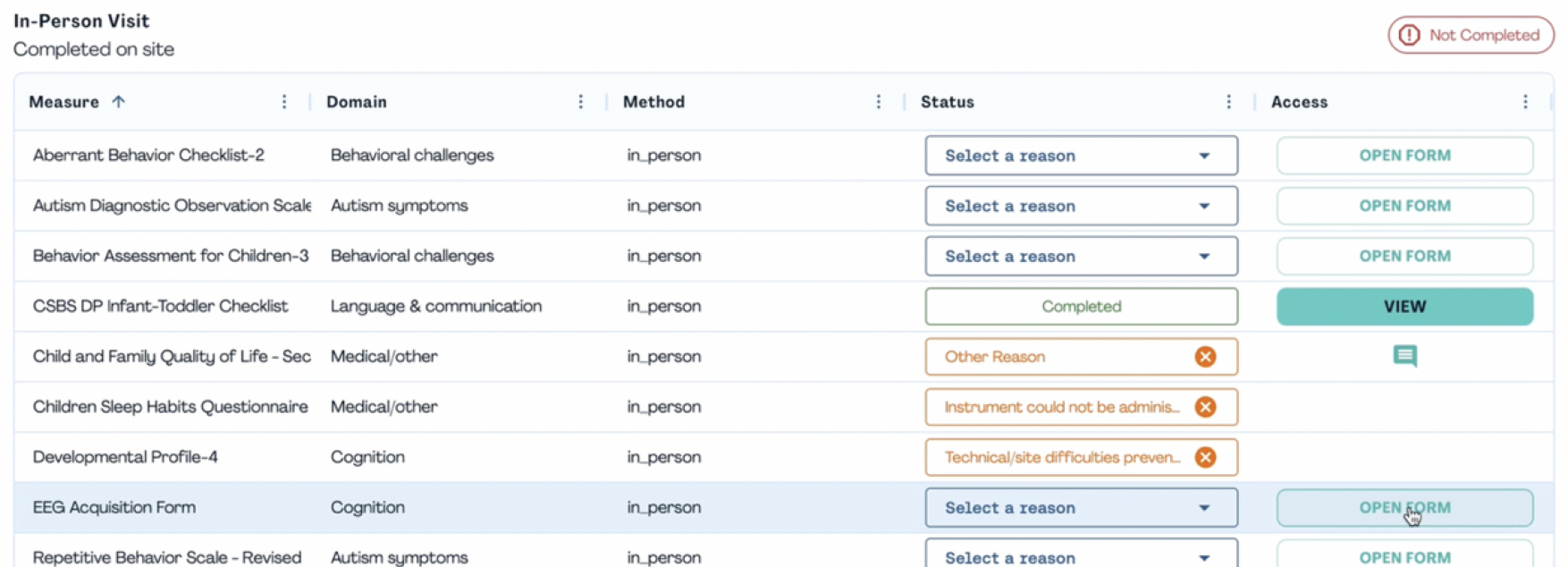
Scan the participant's QR code to launch the visit in the platform. This automatically redirects you to the acquisition form tied to the correct participant and visit.
STEP 2 - Populate the Acquisition Form#
Populate all required fields in the form, including visit details and study information. Upload any supporting files the form calls for before you move forward. EEG uploads come in two parts. The Acquisition file goes up as .mff.zip. The Capping file goes up as .zip.
STEP 3 - Submit the Form#
Once all required information and fi les are added, submit the form through the platform. At submission, the platform automatically starts validating the uploaded data and fi le metadata behind the scenes.
- The filename gets checked against a required pattern in real time, so you'll see an error right away if it doesn't match.
- PSCID, visit and task segments in the fi lename must be lowercase; uppercase input gets rejected or normalized.
- Files can be up to 1GB. Only the formats defined in the form schema go through, and uploading the same file to more than one section is blocked.
- If a
.zipisn't a valid archive, the backend raises ashutil.ReadError.
STEP 4 - Review Validation and Conversion Prompts#
After submission, the platform checks file naming, metadata and formatting requirements. If it finds an issue, you'll get a prompt or notification explaining what needs attention. Once a submission passes, the platform converts the data into the standardized format and prepares it for quality control.
What Happens Behind the Scenes#
The platform#
- Checks file naming and metadata.
- Notifies the site if validation fails.
- Converts valid data to the standardized format.
- Notifies the relevant core team that data are ready for QC.
The core team#
Each modality has its own core team: EEG Core, Eye Tracking Core, Gait Core. All three follow the same review pattern.
- Reviews data quality.
- Sends QC feedback through the site's dashboard and notifications.
- The site views the QC outcome per recording.
- The site acknowledges feedback when required.
- The site re-acquires or re-uploads if necessary.
- At the site, you complete the acquisition form, so metadata match the files you upload. If the system spots a naming or metadata issue, you'll see prompts to fix and re-upload before the data move on.
- Once files pass validation, the platform converts them into the standardized directory and file naming structure and alerts the core team that a new dataset is ready for review.
- QC outcomes surface in dashboards and notifications: you can see which recordings passed, which need follow-up, and whether any protocol issues were identified. For items that require acknowledgement, you confirm in the system once you've reviewed and acted.
EEG Session Form#
The EEG form is configurable per study, but the shape stays the same:
- Session metadata: participant, visit, site, date and cohort are pulled in automatically, alongside experimenter initials and net applier.
- Setup and placement: head circumference, net ID, viewing distance, net placement quality, and checks on key electrodes (Cz, nasion, preauricular points, Oz), plus capping photos and impedance checks before recording starts.
- Task completion: Resting State, VEP, AEP and ASSR are each logged as acquired or not. A task that wasn't acquired gets a reason (declined, ran out of time, technical or site difficulty, medical or physical contraindication, or other). A task that was acquired gets a mood rating, notes, and for VEP, AEP and ASSR, E-prime and DIN flag checks.
- Wrap-up: a PII attestation and file uploads for the raw EEG file, the acquisition log and the capping photo. Uploads only appear if at least one task was acquired; otherwise the form shows a message and skips the upload step.
Eye Tracking Session Form#
The eye tracking form runs on a Tobii Pro Spectrum at 600 Hz, with a fixed paradigm order and a 40-minute session cap. It follows the same shared shape, with more emphasis on calibration:
- Session metadata: auto-populated participant and visit details, plus staff, room and equipment IDs.
- Environment and equipment: ambient light measured against site SOP with a calibrated meter, presentation software and script checks, and tracker connection, firmware and time-sync checks.
- Participant positioning: seating type, 57 cm viewing distance, eye-level centering, head stability and caregiver placement, so the caregiver doesn't block the tracker or direct the participant's gaze.
- Calibration and validation: a 5-point calibration with a point-by-point accuracy record. Average error must stay under 1° to pass; marginal or failing calibrations trigger a re-calibration. Drift checks run again between each paradigm.
- Paradigm log: Social Interactive, Activity Monitoring, Static Social Scenes and PLR are each logged as administered or not, with a reason if skipped. Total session time is capped at 40 minutes, with a reason field if that's exceeded.
- Wrap-up: file uploads for the raw ET data, the session video and the webcam gaze recording, gated on whether any paradigm was administered.
Gait Session Form#
The gait form is completed by the RA and paired with a frontal and sagittal video upload:
- Session metadata: participant and visit details plus experimenter names and testing room.
- Setup checklist: frontal and sagittal cameras present and correctly positioned, full head-to-toe coverage, at least 12 feet of walkway visible, adequate lighting, ankle visibility, frame rate and resolution, surface type and footwear, and the direction of walk defined from the sagittal camera's view.
- Gait acquisition: the goal is 8 self-paced passes. If fewer are collected, the form asks why (participant refusal, equipment issue, behavioral issue, time limitation or other). Each pass records whether it was assisted, whether shoes were worn, and whether the pass is valid, with a reason if not (not self-paced, caregiver influence, camera issue, too few steps, or other).
- In-session notes: since logging every pass in real time is hard to do accurately, sites use a printable note sheet during the session to mark self-paced, assisted and shoe status per pass, then transfer that record into Lasso afterward.
- Wrap-up: frontal and sagittal video uploads, gated on whether any trial was acquired, each with a system-generated file size.
Quick Reference Summary#
The shared path, for any modality:
- Scan the participant's QR code to launch the visit.
- Populate the acquisition form and attach any supporting files it calls for.
- Submit the form.
- Review any validation or conversion prompts and fix what's flagged.
- Watch for QC feedback from the core team, and acknowledge or re-acquire as needed.
What sets each modality apart:
- EEG: net placement and impedance checks, then Resting State, VEP, AEP and ASSR acquisition.
- Eye Tracking: 5-point calibration under 1° error, drift checks between paradigms, and a 40-minute session cap.
- Gait: dual camera setup, a target of 8 self-paced passes, and a printable note sheet for real-time tracking.